1. Reduce Unnecessary Service Costs
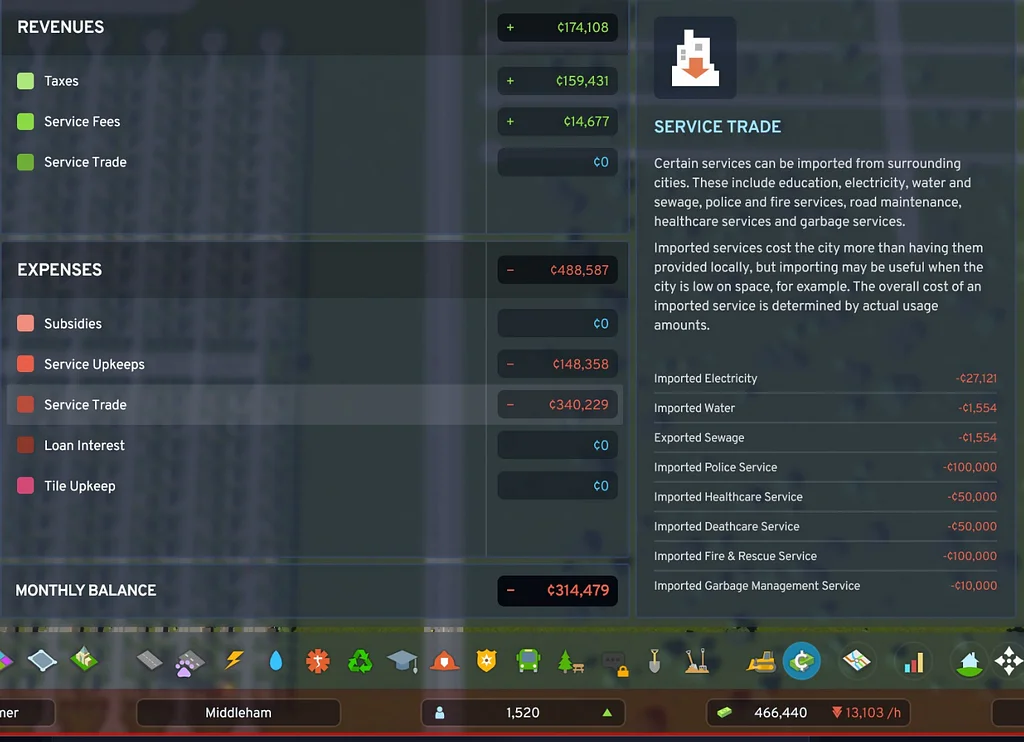
City services, roads, and building upkeep account for most of the money your city spends. Economy 2.0 increased service upkeep costs and removed the government subsidies that previously protected unprofitable cities.
Check whether you are paying for:
- Schools with hundreds of empty places
- Hospitals or clinics serving very few residents
- Excess police or fire capacity
- Public transit carrying almost nobody
- Power plants producing far more electricity than needed
- Upgrades that your city does not currently require
You can reduce individual service budgets from the Services section of the Economy panel. Budgets can be adjusted between 50% and 150%, with lower budgets reducing both operating costs and service efficiency.
Match each budget to the city’s actual needs instead of automatically running every service at full capacity.
2. Grow Your Tax Base
A city becomes sustainably profitable by increasing the number of households and companies paying taxes.
That means providing enough:
- Housing for new residents
- Jobs for the available workforce
- Commercial businesses for household consumption
- Industrial and office companies that can operate profitably
Do not expand every zone equally. Check the demand bars and add the type of zoning the city currently needs.
Commercial demand is linked to household consumption, while industrial and office demand are affected by available workers and the needs of the production chain. Profitable companies provide more reliable tax income than empty or understaffed buildings.
Population growth alone is not enough. New residents also need suitable jobs, or unemployment can weaken further residential demand and leave the city supporting people who are not contributing much tax revenue.
3. Adjust Taxes Gradually
Cities: Skylines 2 allows separate tax rates for:
- Residential zones
- Commercial zones
- Industrial zones
- Office zones
Residential taxes can also be adjusted by education level, while business taxes can be changed for individual product categories. Available tax rates range from -10% to 30%.
There is no single perfect tax rate for every city.
If your budget is slightly negative, raise taxes gradually and watch the demand factors. Higher taxes may increase revenue immediately, but excessive rates can discourage households or companies from moving into the city.
Use taxes to close a manageable budget gap. They cannot permanently rescue a city whose service expenses are wildly higher than its income.
4. Reduce Expensive Imports
Your city’s companies become more profitable when they can obtain resources at reasonable prices.
The Production tab shows whether each resource is in surplus or deficit. Producing resources locally can reduce transportation costs and improve the profitability of businesses that use those materials. Heavy resources such as stone and steel are particularly expensive to transport over long distances.
Specialized industries can produce resources including:
- Grain
- Vegetables
- Cotton
- Livestock
- Timber
- Stone
- Coal
- Ore
- Oil
Local production does not place export money directly into the city treasury. It supports company profits, employment, and the taxes those companies pay.
Use the Production panel to target genuine deficits rather than placing every specialized industry simply because it is available.
5. Manage Electricity Costs
Electricity can either drain the budget or partially support it.
When your city is connected to an outside high-voltage power line:
- Electricity deficits are automatically imported.
- Surplus electricity can be exported.
- Imported electricity is expensive.
- Export revenue can partially cover the cost of producing power.
In a small city, importing electricity may be cheaper than constructing and maintaining a large power plant that is barely being used.
Later, producing electricity locally can reduce import costs. If your plant has enough excess capacity, connecting it properly to an outside power line allows the surplus to be sold.
Check the Electricity Trade meter before adding more production. A power plant is not automatically profitable simply because it exports electricity.
6. Stop Buying Land Too Early
Map tiles now carry an ongoing upkeep cost.
The first nine starting tiles do not have tile upkeep. After that, every purchased tile adds an administrative expense, and the percentage used to calculate upkeep increases as more tiles are acquired.
Buying several tiles long before you develop them can quietly destroy an otherwise healthy budget.
Before expanding, ask whether the new land will quickly support:
- Additional residents
- New companies
- Resource production
- Infrastructure that generates economic growth
Land should create enough new tax income to justify its continuing cost.
7. Use Loans for Productive Expansion
Loans provide immediate cash, but they also add interest and automatic monthly repayments.
Cities: Skylines 2 uses an adjustable loan system. The borrowing limit increases through milestones, and loans can be increased, partially repaid, or fully repaid later.
A loan is useful when it pays for something that allows the city to grow or reduce a larger expense, such as:
- Essential utilities
- Housing and roads for a major expansion
- A service required to support further population growth
- Infrastructure that replaces expensive imports
A loan does not fix a permanently negative operating balance. It only gives the city more time before the money runs out.
8. Give the Economy Time to Recalculate
Tax income and company performance do not always respond immediately after a major change.
After reducing budgets, changing taxes, creating jobs, or adding new zoning, allow the simulation to run before making another adjustment. Paradox notes that companies need time to recalculate production and employment, while tax income may take time to offset new expenses.
Make one or two changes, run the simulation, and check whether the monthly balance is improving.
Quick Money Checklist
When your city is losing money, check these in order:
- Open the Economy panel and identify the largest expense.
- Reduce oversized service budgets.
- Turn off unused or unnecessary buildings.
- Allow existing residential and business zones to fill.
- Create suitable jobs for unemployed citizens.
- Raise taxes gradually if necessary.
- Check the Production tab for costly resource deficits.
- Compare electricity imports against local production costs.
- Stop purchasing tiles until the city can afford their upkeep.
- Use loans only for expansion that can improve future income.
TLDR;
Making money in Cities: Skylines 2 is mostly about controlling the speed of expansion.
Build only the services your current population can support, grow households and businesses together, manage taxes carefully, reduce expensive imports, and avoid buying land before you need it.
Once tax income consistently grows faster than service and tile upkeep, the city will begin producing a sustainable profit.